Iceberg REST Catalog API in Databricks
- Miguel Diaz
- Jan 30, 2026
- 04 Mins read
- Databricks
Managing large volumes of data in distributed environments presents significant challenges: different processing engines, heterogeneous storage formats, and the need to maintain consistency and traceability. Apache Iceberg emerges as a table format designed to simplify data organization in the cloud, enabling efficient read, write, and versioning operations, even in systems with multiple analytics clients.
However, for these tables to be accessible from different tools like Apache Spark, Flink, or Trino, a catalog is required that functions as an intermediary between the data and clients. The Iceberg REST Catalog API, implemented in Databricks’ Unity Catalog, fulfills this function, providing a standardized and secure access point to tables, facilitating interoperability and metadata management in educational, research, and enterprise environments.
What is the Iceberg REST Catalog API?
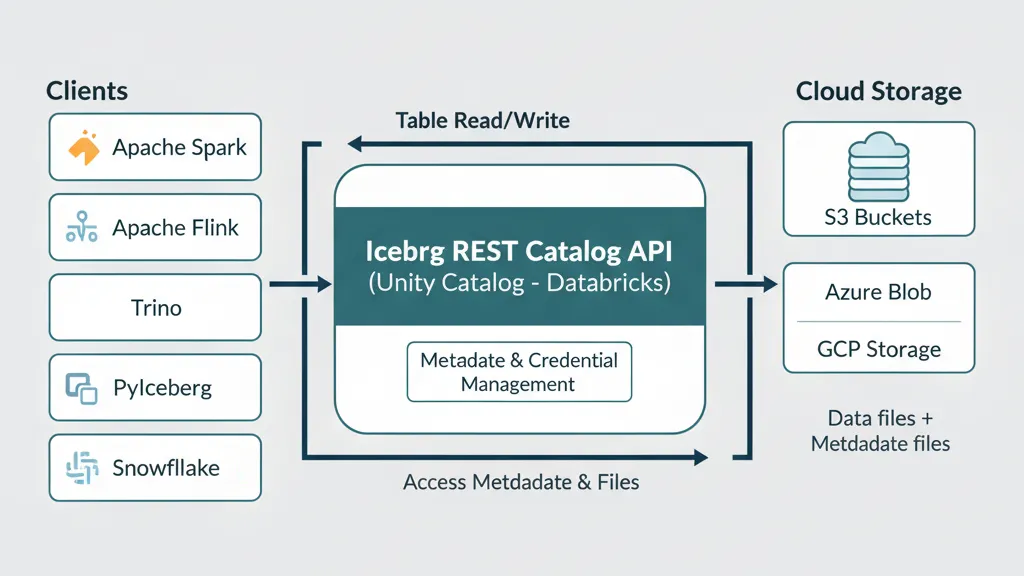
The Iceberg REST Catalog API is Databricks’ implementation of the Apache Iceberg catalog standard offered through Unity Catalog. Its main function is to provide a unified, REST-based access point that allows different processing engines—such as Apache Spark, Flink, Trino, or PyIceberg—to read and, in some cases, write tables registered in Unity Catalog without depending on specific storage configurations.
Instead of interacting directly with metadata in file systems or cloud buckets, clients query the catalog through REST endpoints. This ensures interoperability, centralized permission control, and standardized metadata handling, fundamental aspects in modern distributed data architectures.
Why is the Iceberg REST Catalog API important?
The main problem it solves is data access fragmentation: previously, each tool (Spark, Snowflake, Trino) required its own configuration to access the same tables.
With Unity Catalog’s REST API:
- Single configuration serves all Iceberg-compatible tools
- Automatic temporary credentials eliminate security risks
- No data migration - works with existing Iceberg and Delta tables
Featured use cases
These benefits translate into practical applications that solve real challenges in modern organizations. From teams that need access from multiple tools to companies that prioritize security without sacrificing flexibility:
🔄 Multi-tool Access
Allows Spark, Flink, Trino, Snowflake, and PyIceberg to query the same data without duplication, maintaining a single source of truth.
🛡️ Security and Governance
Temporary credentials reduce security risks and facilitate controlled access in educational or collaborative environments.
⚡ Pipeline Simplification
Reading and writing Iceberg tables from different clients eliminates the need for complex point-to-point integrations.
🔀 Delta to Iceberg Migration
Facilitates reading Delta tables via Iceberg, useful for research environments and gradual migration processes.
Technical characteristics of the Iceberg REST Catalog API
Unity Catalog implements the Iceberg REST Catalog standard providing external access to tables registered in the metastore through REST endpoints:
| Feature | Description | Details |
|---|---|---|
| Protocol | Compatible with Iceberg REST Catalog specification | Standard endpoints /v1/catalogs, /v1/config |
| Authentication | OAuth 2.0 and Personal Access Tokens (PAT) | Bearer tokens in HTTP headers |
| External access | Configuration required in Unity Catalog | Manual metastore enablement |
| Supported formats | Iceberg and Delta tables with UniForm | Unified reading of both formats |
| Credential vending | Automatic temporary credentials | Short-duration tokens for cloud storage |
| Integration | Unity Catalog permissions system | Inherits existing security policies |
API configuration and endpoints
The Iceberg REST API is available at the base path /api/2.1/unity-catalog/iceberg-rest and follows the standard Iceberg REST Catalog specification:
| Endpoint | Method | Purpose |
|---|---|---|
/v1/config | GET | Get catalog configuration and temporary credentials |
/v1/catalogs | GET | List available catalogs |
/v1/catalogs/{catalog}/namespaces | GET | List schemas in a catalog |
/v1/catalogs/{catalog}/namespaces/{namespace}/tables | GET | List tables in a schema |
/v1/catalogs/{catalog}/namespaces/{namespace}/tables/{table} | GET | Get specific table metadata |
Security and authentication configuration
To enable external access to the Iceberg REST Catalog API, the following is required:
- Enable external metastore access in Unity Catalog configuration
- Grant
EXTERNAL USE SCHEMAprivileges to the user/service that will configure the integration - Configure authentication via OAuth 2.0 or Personal Access Token (PAT)
- Define access scope using the
warehouseparameter that specifies the Unity Catalog catalog - Configure credential vending for secure access to underlying data
Usage examples
Apache Spark
For Spark to access Unity Catalog tables via Iceberg REST, a catalog must be configured in the Spark session:
"spark.sql.extensions": "org.apache.iceberg.spark.extensions.IcebergSparkSessionExtensions",
"spark.sql.catalog.<spark-catalog-name>": "org.apache.iceberg.spark.SparkCatalog",
"spark.sql.catalog.<spark-catalog-name>.type": "rest",
"spark.sql.catalog.<spark-catalog-name>.rest.auth.type": "oauth2",
"spark.sql.catalog.<spark-catalog-name>.uri": "<workspace-url>/api/2.1/unity-catalog/iceberg-rest",
"spark.sql.catalog.<spark-catalog-name>.oauth2-server-uri": "<workspace-url>/oidc/v1/token",
"spark.sql.catalog.<spark-catalog-name>.credential":"<oauth_client_id>:<oauth_client_secret>",
"spark.sql.catalog.<spark-catalog-name>.warehouse":"<uc-catalog-name>",
"spark.sql.catalog.<spark-catalog-name>.scope":"all-apis"
Key variables:
<uc-catalog-name>: catalog in Unity Catalog<spark-catalog-name>: catalog name in Spark<workspace-url>: Databricks workspace URL<oauth_client_id>and<oauth_client_secret>: OAuth credentials
Snowflake
To access from Snowflake, configure a catalog integration that points to the REST endpoint:
CREATE OR REPLACE CATALOG INTEGRATION <catalog-integration-name>
  CATALOG_SOURCE = ICEBERG_REST
  TABLE_FORMAT = ICEBERG
  CATALOG_NAMESPACE = '<uc-schema-name>'
  REST_CONFIG = (
    CATALOG_URI = '<workspace-url>/api/2.1/unity-catalog/iceberg-rest',
    WAREHOUSE = '<uc-catalog-name>',
    ACCESS_DELEGATION_MODE = VENDED_CREDENTIALS
  )
  REST_AUTHENTICATION = (
    TYPE = BEARER,
    BEARER_TOKEN = '<token>'
  )
  ENABLED = TRUE;
PyIceberg
Configuration in PyIceberg is straightforward:
catalog:
  unity_catalog:
    uri: https://<workspace-url>/api/2.1/unity-catalog/iceberg-rest
    warehouse: <uc-catalog-name>
    token: <token>
Direct calls with cURL
You can also query tables using REST directly:
curl -X GET -H "Authorization: Bearer $OAUTH_TOKEN" -H "Accept: application/json" \
https://<workspace-instance>/api/2.1/unity-catalog/iceberg-rest/v1/catalogs/<uc_catalog_name>/namespaces/<uc_schema_name>/tables/<uc_table_name>
Typical response:
{
  "metadata-location": "s3://bucket/path/to/iceberg/table/metadata/file",
  "metadata": <iceberg-table-metadata-json>,
  "config": {
    "expires-at-ms": "<epoch-ts-in-millis>",
    "s3.access-key-id": "<temporary-s3-access-key-id>",
    "s3.session-token":"<temporary-s3-session-token>",
    "s3.secret-access-key":"<temporary-secret-access-key>",
    "client.region":"<aws-bucket-region-for-metadata-location>"
  }
}
Conclusion
The Iceberg REST Catalog API of Unity Catalog in Databricks allows enterprises to integrate various analytics and processing clients without compromising data security or consistency. With support for Spark, Snowflake, PyIceberg, and cURL, it is the recommended way to access Iceberg tables programmatically and securely.
tip
Use credential vending whenever possible to improve security and performance.